How to Link Shopify and Amazon Inventory (Without Losing Your Mind)
Linking Shopify and Amazon together to manage Inventory doesn't have to be difficult

Evan
Founder

You added Amazon. Smart move, it's where the buyers already are. But about a week in, it happens: someone orders the last unit of your bestseller on Amazon, and Shopify still proudly displays "In Stock." Now you owe two customers one product, and you get to pick who gets the apology email.
This is the most common, and most avoidable, failure point for new multichannel sellers. And it's exactly why "how to link Shopify and Amazon inventory" gets searched so often. People don't actually want a connection. They want accuracy. Big difference.
The real question isn't "how do I connect them," it's "how do I keep them honest"
Connecting Shopify and Amazon takes ten minutes. Keeping their stock counts telling the same story, every hour, forever? That's the actual job. Here's what's really being asked when someone types that search:
How do I stop overselling the same unit on two channels?
What happens to stock during the lag between a sale and a sync?
Do I need a tool, or can I just do this myself?
What's the "right" way professionals handle this, not the workaround?
So let's answer all four.
The 3 ways people actually link Shopify and Amazon inventory
There isn't one "correct" method, there's a tradeoff. Here's the honest comparison:
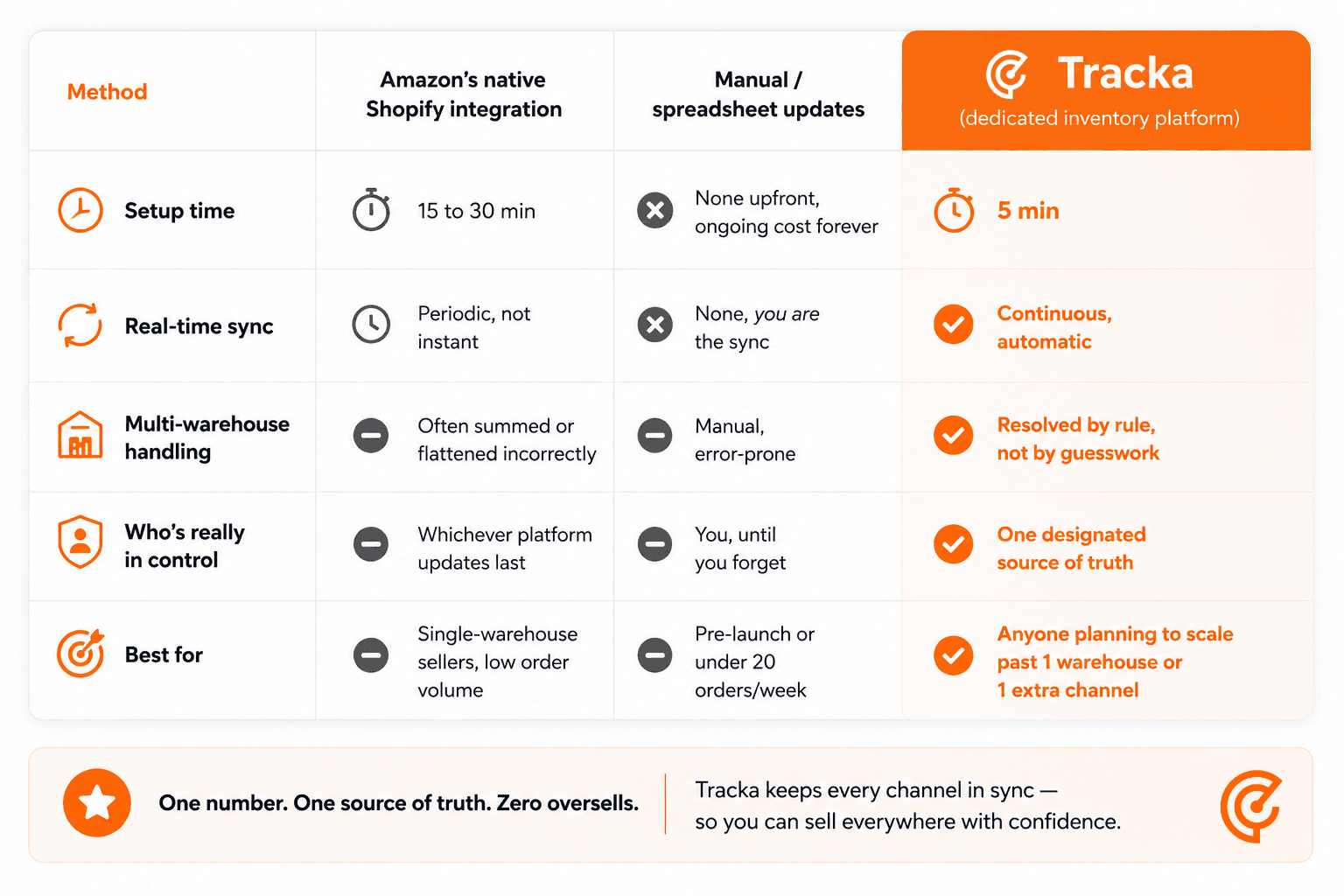
The native integration and manual updates both feel fine, right up until volume increases or you add a second warehouse. Then the cracks that were invisible at low volume become very visible, very fast.
Why syncing breaks even when it's "connected"
This is the part most guides skip, and it's the actual root cause behind 90% of oversell complaints:
1. SKUs don't match the way you think they do. TSHIRT-BLK-M on Shopify and tshirt-blk-m on Amazon look identical to a human. To a system doing an exact string match, they're two different products. One channel updates, the other doesn't, and now you're out of sync without ever knowing it.
2. Multi-warehouse stock gets summed, not assigned. If you fulfill from two warehouses, Amazon (and most basic integrations) will often total them into one number. That total can silently overwrite your real count, even when your real count was already correct. You don't lose visibility gradually; you lose it the moment a sync runs.
3. Nobody's actually "in charge" of the number. This is the big one. If both Shopify and Amazon are allowed to push stock updates back and forth, you end up with a quiet tug-of-war, each platform "correcting" the other based on stale data. The fix isn't more syncing. It's less, done correctly.
The fix: pick one source of truth, and never let channels override it
Here's the principle that actually solves this, and it's simpler than it sounds:
One system holds the real number. Every channel receives from it. No channel writes back to it.
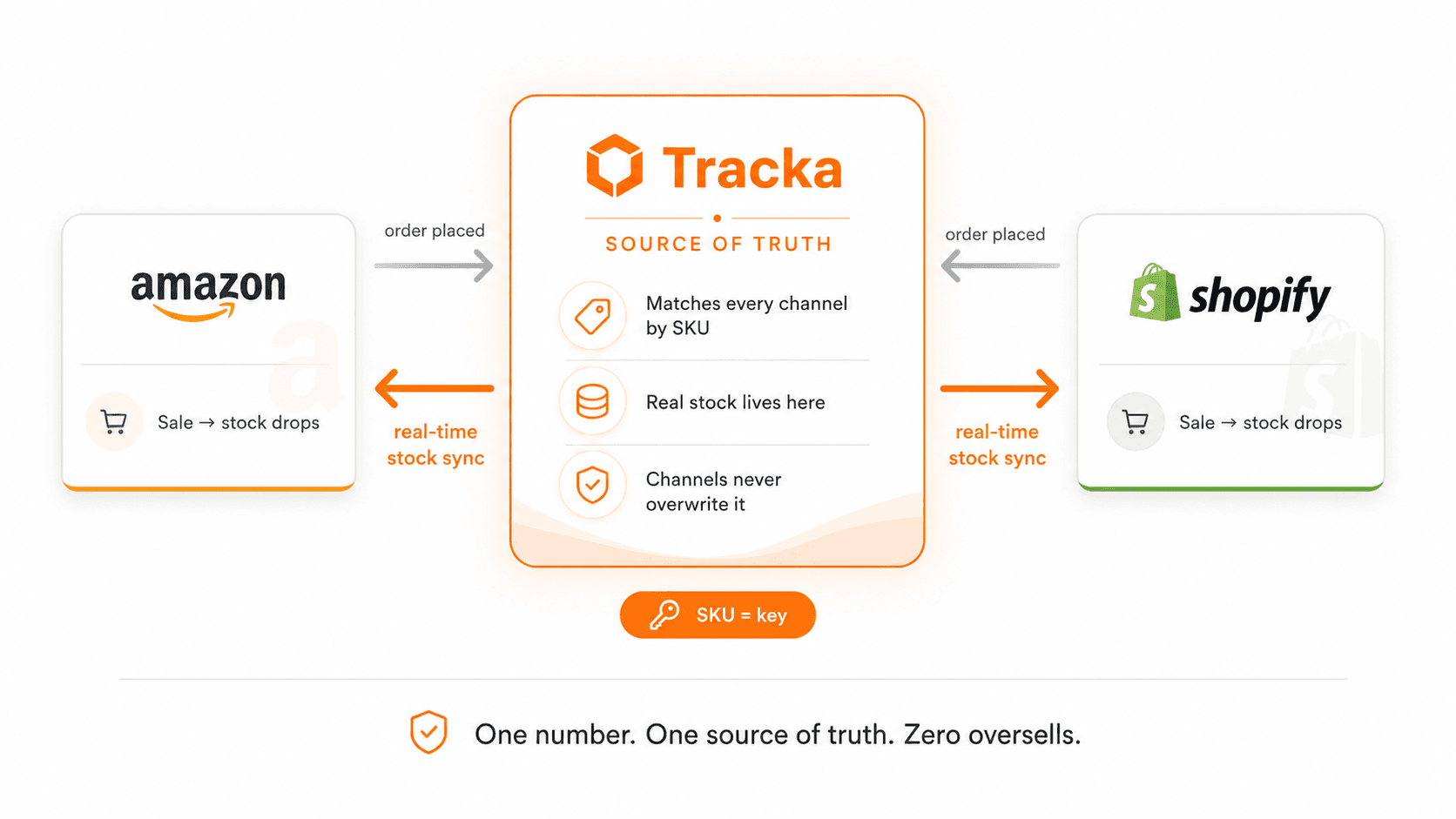
When an order comes in, from either channel, that sale gets recorded against the true stock count, and the corrected number gets pushed back out to every other channel. Channel inventory data flows in as a signal ("a sale happened"), never as an instruction ("set my count to this"). That one rule eliminates the tug-of-war completely.
It also solves the multi-warehouse problem automatically: instead of letting Amazon sum two warehouses into a number that doesn't match reality, the true total gets assigned to one primary location and zeroed out everywhere else Amazon might double-count it from. The result Amazon shows always equals what you actually have, not what its math thinks you have.
The checklist: things that quietly wreck multichannel sync
Run through this before you assume your setup is solid:

FAQs
Does Shopify's native Amazon integration sync inventory automatically? It syncs, but typically on a delay and often based on summed warehouse totals rather than a verified true count, which is exactly where oversells sneak in during busy periods.
What actually happens if I oversell on Amazon? Beyond the refund and apology, repeated oversells hurt your seller metrics and can affect your Buy Box eligibility. It's a reputation cost, not just a logistics one.
Can I sell the exact same SKU on Shopify and Amazon at the same time? Yes, and you should. The key is making sure both channels are reading from (and reporting back to) the same real-time number, not two independently updating counts.
How often should inventory actually sync between channels? For anything beyond a handful of weekly orders, "real-time" is the only safe answer. Hourly or daily syncing is a polite way of saying "occasionally accurate."
The takeaway
Linking Shopify and Amazon isn't hard. Keeping them honest with each other is the actual challenge, and it comes down to one decision: pick a single source of truth, match everything by SKU, and never let a channel overwrite the number that matters.
That's the exact logic Tracka runs under the hood: SKU-based matching, one source of truth, and automatic correction across every warehouse and channel you add. If you're past the spreadsheet stage and tired of playing referee between platforms, it's worth a look.